
Binary Art Generator
Turn any image into Binary, ASCII, Braille, or Block character art — right in your browser. No signup, completely free.
Hey everyone — students, developers, and digital artists!
I hope you’re enjoying the binary tools we’ve built so far. They’re not just for learning — they’re genuinely fun and interactive too.
To take things to the next level, I’m excited to introduce our brand-new Binary Art Generator!
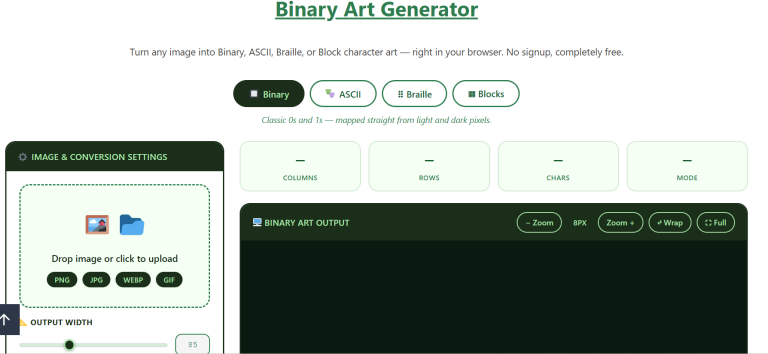
I have spent quite some time to develop this tool. The fun part is that you can also use your selfies to see how your image transforms into binary. This free online tool instantly transforms any photo into stunning binary art (0s and 1s) or detailed ASCII masterpieces — no installation, no sign-up, no watermarks.
Just upload your image and watch it turn into beautiful text-based art in seconds. You get real-time previews, custom characters (yes, emojis work too!), multiple styles, and professional-grade results.
Whether you’re here to learn, create retro hacker vibes, or just have fun turning selfies into ASCII portraits, this tool has you covered.
Keep scrolling to see exactly how easy it is to use!
Feel free to use this exact version — it converts much better while still feeling personal and authentic!
Why You will Love to Use Our Generator?
- Multiple Art Styles
Choose from classic binary (0/1), dot patterns, block characters, or even custom symbols and emojis. Create everything from minimalist binary portraits to vibrant emoji mosaics. - Real-time Processing
Watch your image transform instantly as you tweak settings — no waiting, no uploads, no refresh needed. - Mobile-Friendly
Works perfectly on phones and tablets. Turn selfies into ASCII art on the go. - Multiple Export Options
Download as a high-resolution PNG, plain text file, or simply copy to clipboard and paste anywhere. - Precise Control
Fine-tune brightness, contrast, threshold, density, and character mapping for pixel-perfect results. - Custom Characters & Emojis
The only tool that lets you use ANY characters you want — build art with ♥★✈, currency symbols, or even your favorite memes.
How to Use the Binary Art Generator?
Step 1: Upload Your Image
- Click the upload area or simply drag & drop your desired photo (JPG, PNG, GIF, WebP all supported)
- Once up, the original image will appear instantly on the right
A little surprise for cellphone lovers! It works perfectly on mobile too. Try it now! Jjust take a selfie and drop it in to see the results!
Step 2: Choose Your Art Style
In the Binary Settings panel:
- Output Width → Slide to make your art wider or narrower (20–200 characters)
- Binary Pattern → Pick your favorite look:
- 0 and 1 → Classic binary code style
- • and ◦ → Minimal dot art
- █ and ░ → Block/shade style
- Custom Characters → Type ANY symbols you want (emojis work too!)
Step 3: Switch Between Binary & ASCII Modes
Look for Output Type in the right panel:
- Binary → Pure 0s & 1s (or your custom characters)
- ASCII Art → Beautiful grayscale art using characters like @#*+=-:.
You can also change the ASCII Intensity Mapping ramp for different levels of detail.
Step 4: Fine-Tune the Look (Real-Time Preview!)
All changes update instantly:
- Brightness / Contrast → Make it pop
- Threshold → Controls light vs dark cutoff
- Invert → Flip dark and light areas
- Character Density → Make it taller or shorter while keeping proportions
Step 5: Export Your Masterpiece
Once it looks perfect, choose one of these buttons:
- Copy to Clipboard → Paste directly into Discord, Reddit, emails, etc.
- Save as PNG → High-quality image with crisp green-on-black look
- Save as Text → Plain .txt file (great for code projects or terminals)
Pro Tips for Amazing Results
- For classic hacker/movie style → Use “0 and 1” with high contrast
- For artistic portraits → Switch to ASCII mode + “Full Range” ramp
- Want emoji art? → Select “Custom” and type hearts, stars, or any symbols
- Mobile users → Everything works perfectly in portrait mode
That’s it! No sign-up, no watermarks, no limits — completely free forever.
Ready to create something awesome? Drag your favorite photo in right now and watch the magic happen!
FAQs
That’s it! No sign-up, no watermarks, no limits — completely free forever.
Ready to create something awesome? Drag your favorite photo in right now and watch the magic happen!
Start Creating Binary Art Now!
If you want to try other exciting tools, enjoy exploring Binary Music! Or go back to basics with our binary code translator for text-to-binary conversions.