
Text to Binary Converter — Encode Any Text Instantly
Type or paste any text below to instantly encode it into binary. Every character is converted to its 8-bit ASCII value — no signup, completely free.
What Does “Text to Binary” Actually Mean?
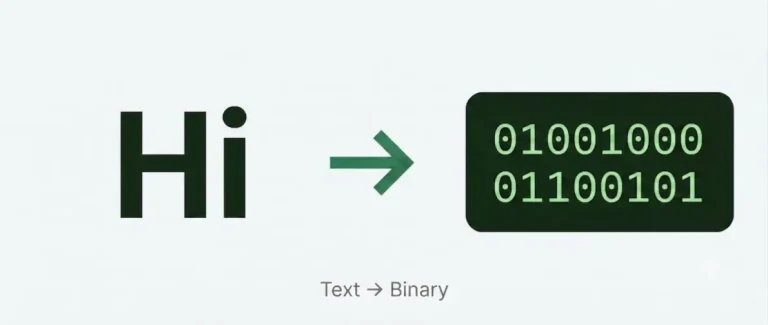
When you type the letter H, your computer doesn’t store the shape of that letter. It stores the number 72. And it doesn’t store 72 the way we write it — it stores it as a binary value: 01001000.
Text to binary conversion is simply the process of turning each character in your text into its binary representation. Every letter, number, space, and punctuation mark has a numeric code assigned to it by a standard called ASCII (American Standard Code for Information Interchange). Binary is how computers express those numbers using only two digits: 0 and 1.
So when you encode text to binary, you are doing two things for every character:
- Looking up the ASCII code for that character
- Converting that decimal number into an 8-bit binary value
Type Hello into the tool and you get 01001000 01100101 01101100 01101100 01101111 — five characters, five bytes, five 8-bit groups.
How Text to Binary Encoding Works — A Complete Beginner’s Guide
Most tools let you convert without ever explaining what’s happening underneath. This page won’t do that. Understanding how encoding works gives you a foundation that applies to everything from file formats to network protocols to cryptography.
Characters, Numbers, and ASCII
Every character on your keyboard has a number. That mapping is defined by ASCII — a standard created in the 1960s that assigned a unique number to 128 characters: uppercase and lowercase letters, digits 0–9, punctuation marks, and a handful of control characters.
When you press A, your computer registers the number 65. When you press a, it registers 97. When you press a space, it registers 32. ASCII is the dictionary your computer uses to translate keystrokes into numbers it can store and process.
From Decimal to Binary
Once you have the ASCII code for a character, the next step is converting that decimal number into binary. Binary is base-2 — instead of ten digits (0–9), it uses only two: 0 and 1.
Each position in a binary number represents a power of 2, increasing from right to left:
| Position (right → left) | Power | Value |
|---|---|---|
| 1st | 2⁰ | 1 |
| 2nd | 2¹ | 2 |
| 3rd | 2² | 4 |
| 4th | 2³ | 8 |
| 5th | 2⁴ | 16 |
| 6th | 2⁵ | 32 |
| 7th | 2⁶ | 64 |
| 8th | 2⁷ | 128 |
To convert a decimal number to binary, find which powers of 2 add up to your number. Place a 1 in those positions and a 0 everywhere else. Always pad to 8 digits.
Example — encoding the letter H (ASCII 65):
65 = 64 + 1 = 2⁶ + 2⁰
| Bit position | 128 | 64 | 32 | 16 | 8 | 4 | 2 | 1 |
|---|---|---|---|---|---|---|---|---|
| Binary digit | 0 | 1 | 0 | 0 | 0 | 0 | 0 | 1 |
Result: 01000001
Step-by-Step: How to Encode Text to Binary by Hand
Let’s encode the word Hi manually, character by character.
Step 1 — Look Up the ASCII Code for Each Character
Use the ASCII chart below or any standard reference.
| Character | ASCII Code |
|---|---|
| H | 72 |
| i | 105 |
Step 2 — Convert Each ASCII Code to Binary
Work through each decimal value using the powers of 2 table. Find which powers add up to your number, put a 1 in those positions, and 0 everywhere else.
H = 72:
72 = 64 + 8 = 2⁶ + 2³
| 128 | 64 | 32 | 16 | 8 | 4 | 2 | 1 |
|---|---|---|---|---|---|---|---|
| 0 | 1 | 0 | 0 | 1 | 0 | 0 | 0 |
→ 01001000
i = 105:
105 = 64 + 32 + 8 + 1 = 2⁶ + 2⁵ + 2³ + 2⁰
| 128 | 64 | 32 | 16 | 8 | 4 | 2 | 1 |
|---|---|---|---|---|---|---|---|
| 0 | 1 | 1 | 0 | 1 | 0 | 0 | 1 |
→ 01101001
Step 3 — Join the Bytes with Spaces
Each byte represents one character. Separate them with spaces for readability.
Result: 01001000 01101001
Paste that into the Binary to Text Converter and it decodes straight back to Hi.
ASCII Reference — Characters and Their Binary Values
Use this chart to look up any character’s binary value when encoding by hand.
Use this table to decode any byte by hand or verify your results. Every value follows the ASCII standard and UTF-8 encoding for the printable character range.
| Char | Binary | Decimal | Hex | Type |
|---|
Uppercase vs Lowercase — One Bit Makes the Difference
One of the most elegant patterns in ASCII is how uppercase and lowercase letters relate to each other in binary. They differ by exactly one bit — bit position 6 (value 32).
| Character | ASCII | Binary |
|---|---|---|
| A | 65 | 01000001 |
| a | 97 | 01100001 |
| B | 66 | 01000010 |
| b | 98 | 01100010 |
| Z | 90 | 01011010 |
| z | 122 | 01111010 |
The pattern: lowercase letters have a 1 in the 6th bit position (value 32), uppercase letters have a 0. That single bit flip is the entire difference between upper and lowercase in ASCII.
This is why the first 3 bits of any letter byte tell you the case at a glance:
010→ uppercase011→ lowercase
Encoding Numbers and Symbols
Letters aren’t the only characters with binary representations. Digits, punctuation, and symbols all have their own ASCII codes too — and they don’t follow the letter patterns.
| Character | ASCII | Binary |
|---|---|---|
| 0 | 48 | 00110000 |
| 1 | 49 | 00110001 |
| 9 | 57 | 00111001 |
| Space | 32 | 00100000 |
| ! | 33 | 00100001 |
| ? | 63 | 00111111 |
| @ | 64 | 01000000 |
| . | 46 | 00101110 |
A few things worth noticing: the digit 0 in ASCII is not the same as binary zero — it’s 00110000 (decimal 48). A space character encodes to 00100000 and takes up a full byte just like any letter. Every character, no matter how simple, always occupies exactly 8 bits.aging.
Beyond ASCII — Encoding Special Characters with UTF-8
ASCII handles 128 characters — sufficient for standard English. But modern text includes far more: accented letters, non-Latin scripts, emoji, and thousands of other symbols. That’s where UTF-8 takes over.
UTF-8 is backward-compatible with ASCII — any ASCII character encodes identically in UTF-8. But for characters outside the ASCII range, UTF-8 uses 2, 3, or 4 bytes:
| Character type | Bytes | Example |
|---|---|---|
| Standard English (ASCII) | 1 | A → 01000001 |
| Extended Latin | 2 | é → 11000011 10101001 |
| CJK characters | 3 | 中 → 11100100 10111000 10101101 |
| Emoji | 4 | 😀 → 11110000 10011111 10011000 10000000 |
Our tool handles UTF-8 encoding automatically. Type an emoji or an accented character and the tool will produce the correct multi-byte binary output. For manual encoding, stick to single-byte ASCII characters — multi-byte UTF-8 requires a more involved process.
Code It Yourself — Text to Binary in 3 Languages
Seeing the logic in code makes the concept click in a different way. Here’s how text to binary encoding works in three languages — the same operation the tool performs:
Python
text = "Hello"
binary = ' '.join(format(ord(ch), '08b') for ch in text)
print(binary)
# 01001000 01100101 01101100 01101100 01101111
JavaScript
const text = "Hello";
const binary = text.split('')
  .map(ch => ch.charCodeAt(0).toString(2).padStart(8, '0'))
  .join(' ');
console.log(binary);
// 01001000 01100101 01101100 01101100 01101111
PHP
$text = "Hello";
$bytes = str_split($text);
$binary = implode(' ', array_map(fn($ch) => str_pad(decbin(ord($ch)), 8, '0', STR_PAD_LEFT), $bytes));
echo $binary;
// 01001000 01100101 01101100 01101100 01101111
The pattern is identical in every language: iterate through each character → get its character code → convert to base-2 → pad to 8 digits → join with spaces.
Practice Exercises — Encode These Yourself
Work through these by hand using the ASCII chart and powers-of-2 table above, then verify your answer using the tool.
Beginner
Encode: OK
(Hint: O = 79, K = 75)
Intermediate
Encode: Hi!
(Three characters including punctuation)
Challenge
Encode: Code
(Four characters, mixed case — pay attention to bit position 6)
(Answers: 01001111 01001011 / 01001000 01101001 00100001 / 01000011 01101111 01100100 01100101)
Real-World Uses of Text to Binary Encoding
Understanding text to binary encoding isn’t just an academic exercise. Here’s where it applies directly:
Data storage and file formats — Every text file on your computer is ultimately a sequence of binary-encoded characters. A plain .txt file is nothing more than a chain of 8-bit ASCII or UTF-8 values stored on disk.
Network communication — When data travels across a network, it moves as binary. Every HTTP request, email, and chat message is text that has been encoded into binary for transmission and decoded on the other end.
Cryptography and encoding — Many encryption and encoding schemes (Base64, XOR cipher, SHA hashing) operate directly on binary data. Understanding how text becomes binary is the first step to understanding how those systems work.
Computer science education — Text-to-binary encoding is a standard topic in CS courses at every level, from high school to university. Working through it by hand builds a genuine understanding of how data is represented and stored.
Debugging and data inspection — Developers working with binary protocols, file parsers, or low-level systems regularly need to inspect binary data and understand what character it represents. Encoding text by hand helps build the intuition needed for that work.
Secret messages and CTF challenges — Binary-encoded messages appear regularly in Capture The Flag competitions and puzzle games. Knowing how to encode and decode by hand gives you an edge.
FAQs
Keep Learning
Now that you understand how text to binary encoding works, explore the rest of the toolkit:
- Binary to Text Converter — decode binary back into readable text
- Binary to Decimal Converter — convert binary numbers to base 10
- Binary to Hexadecimal — the compact shorthand programmers use
- Binary Calculator — perform arithmetic directly in binary
A note on this page: The tool handles all of this automatically — but if you work through even one word by hand using the steps above, the concept will stay with you in a way that no tool can replicate. Start with your name. Three minutes is all it takes.